


10,000 photos in three years. How many did I look at?
Once you have a child, the photos never stop piling up.
I have two daughters, and when I counted, I had been adding somewhere between 8,000 and 12,000 photos a year. A sports day or a trip adds a few hundred in a single afternoon, so it adds up faster than it feels like it should.
Going by the numbers alone, that should be more than enough of a record. And yet I have never gone back through last year’s photos from the beginning. With that many to get through, I doubt many people have.
Too many to want to open. And when you do open them, ten or twenty near-identical shots in a row, and you can’t tell which one was the best of that day. The scrolling never ends. Eventually you think right, I’ll sort this out properly when I have time — and close it.

This isn’t laziness. Any sorting job that starts with several thousand photos is one that never ends.
“I’ll do it all later” is what stops you
Photo sorting doesn’t stick, and the reason isn’t willpower. It’s how the task is set up.
The moment you decide to do it all later, the task becomes deal with ten thousand photos. It takes effort to start, leaves a half-sorted mess if you stop partway, and makes opening it next time even harder.
Sorting after the fact also runs into another problem: you can’t remember the day. Of the twenty photos from a Tuesday six months ago, which one is most like that day? What was obvious when you took them isn’t obvious half a year later. They just look like similar photos in a row.
The only time you can choose is while the day is still fresh.
You don’t have to sort what’s already there
This is the part I most want to get across.
The thousands you already have don’t need sorting.
You don’t need to delete them either. If you have the storage, leave them where they are. Try to clear the past before you start, and that’s where you’ll stop.
Starting today is enough. Decide one photo a day from here on, and a year from now you’ll have 365 “best of that day” photos lined up. The ten thousand behind them can stay asleep.
The point of sorting isn’t to end up with fewer photos. It’s to have them in a form you can look back through. You can get there without deleting a thing.
Pick today’s one photo
All you do is choose one photo at the end of the day. You can start without an app.
- Open the photos you took that day (in the iOS Photos app, the “Days” view in your library)
- Choose the one that’s most like that day. Not the best shot — the one that brings the day back
- Mark it as a favorite (♡), or make an album called “one a day” and put it there
That’s all. It takes a few seconds.
You don’t delete the rest, and you don’t organize them. Your camera roll stays exactly as it is; you’re only putting one mark on it that says this was today.
On a day you took nothing, it becomes a reason to take one. You don’t have to wait for something special to happen. A face turned sideways at dinner, a hand helping out in the kitchen — anything that brings the day back is enough.
Three things to decide up front
What separates stopping after three days from keeping it up for a year comes down to these.
-
Fix when you choose. Before bed, after the kids are down, on the train. Anywhere, as long as it’s the same moment every day. “When I remember to” doesn’t last. You’ll simply forget.
-
Don’t set the bar at “a good shot.” Soft focus, eyes closed — if it brings the day back, that’s enough. The higher the bar, the more of a chore choosing becomes.
-
Don’t try to fill in the days you missed. If you skip three days, let those three stay empty. Filling them means choosing in bulk, which is “I’ll do it all later” all over again.
From my own experience, the first one matters most. I set a reminder on my phone so I wouldn’t forget — though on the days I could, I’d get to it earlier.
Making one a day into a system
Favorites and albums will get you started, but two problems show up as you keep going.
The first is losing track of which days you’ve done. Photos build up in the album, but you can’t tell at a glance whether you picked one last Wednesday.
The second is that it’s hard to look back through. An album is just capture dates scattered down a list — it isn’t shaped like 365 days in sequence.
our365 exists to take those two off your hands. Choose one a day and it lands on a calendar. Days you skipped stay visibly empty, so I haven’t done yesterday is obvious. After a year, all 365 days sit in order from the start.
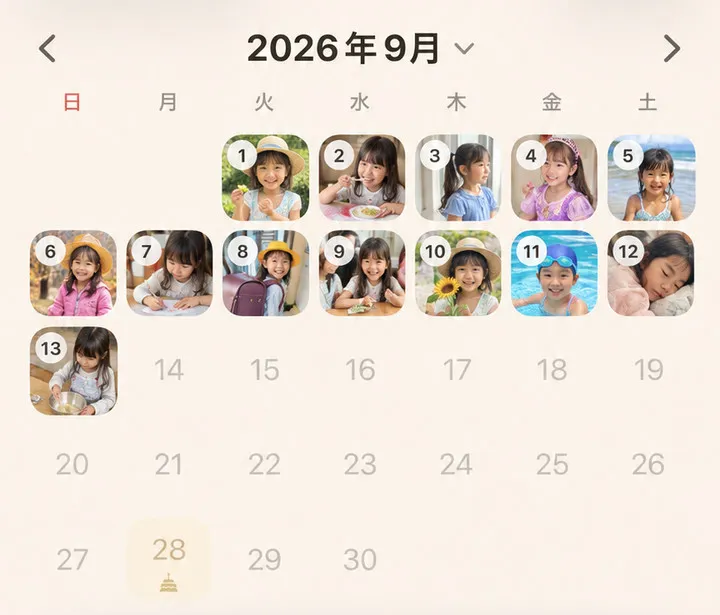
Being able to take it in at a glance turns out to be the useful part. The thumbnails let you look back over what each day held, and tapping a day brings up the photo along with the one-line note. I reach for it more than I expected to.
Your photos stay on your iPhone and in your iCloud. They are never sent to our servers. Sorting your own photos shouldn’t mean handing them to anyone.
Your camera roll a year from now
A year from now, your camera roll will still be filling up. That’s fine.
But if 365 of them are the ones you chose on the day itself, you can look back through the year from the beginning. A camera roll you finally finished sorting is probably less useful than 365 photos you actually look at.
Start with today’s, and you haven’t missed anything.
